Motorola index
Back to Home
Initialization Choices
By Robert W. Meister WA1MIK

|
MaxTrac index Motorola index Back to Home |
MaxTrac Software Initialization Choices By Robert W. Meister WA1MIK |
|
Blanking and Initialization:
To change a MaxTrac from trunking to conventional, you need to blank the logic board with LAB software, replace the firmware, and initialize the logic board with regular software. This procedure gives the radio the distinct personality and operating parameters that let it work optimally on the band it was intended for. (A similar procedure can be followed for the Radius products, but the field contents and choices will be slightly different.)
Trunking radios have different model numbers than conventional radios, so you will need to choose a model number during this procedure. The one on the label can't be used. It makes sense to add your own label, with the model number you choose in this procedure, somewhere on the PA heat sink. You should, however, enter the actual radio serial number (as printed on the label) in the field provided. If you can't read the label, you might be able to read the existing code plug from the radio and extract it before you blank and reinitialize.
Typical 900 MHz trunking model numbers will start with D27 or D37, followed by MQA5G or MWA5G, followed by B2, B3, B6, B7, C3, or C5 and two other letters.
When you start the program, you should go immediately to the SERVICE menu. Choose "BOARD REPLACEMENT" rather than "ALIGNMENT", then choose "Logic Board".
You will be presented with a list of menu steps. You must go through each and every step in the order shown. As you fill in or choose values for the fields on each screen, press F8 to write the information to the radio and return to the list of menu steps, or press F10 to leave the screen's values intact (without writing them to the radio) and return to the list of menu steps, where you can go to the next step. This lets you review most of the existing data.
The first screen lets you enter the crystal data, tuning data, and 9.6V voltage for VHF, UHF, and 800 MHz radios. Slightly different data is entered for 900 MHz radios. You can not retrieve this information from the software; you must enter it fresh each time, or press F10 to skip this screen. (There are several step-by-step articles that go through the complete logic board initialization in the MaxTrac section of this web site; refer to these for further details.)
If the program detects a blank logic board when the initialization process begins, a once-only screen is presented where you must select several things like the Product Line, Model Name, Frequency Range, and Model Number. The eventual list of possible model numbers depends on all the previous choices. You will also need to enter a Panel Number and the radio's Serial Number.
I blanked a 30-watt 900 MHz MaxTrac and performed the complete board initialization process. I wrote down all the possible choices for each field on the once-only screen that is only presented after blanking a radio. The choices I made for this particular radio are shown in the tables below as rows with a green background.
When you choose a value for the Product Line, this limits your choices for the Model Name, and that further limits your choices for the Range. Together these determine a list of possible Model Numbers, which gives you specific capabilities to choose from, such as the number of modes, transmitter output power, signaling, and other features. Some of these are shown on the right side of this screen (this is for a UHF radio, so you should disregard the exact field values). These items will change as you cycle through the model numbers. The process is complete below; I just have to hit F8 to commit this information to the radio.
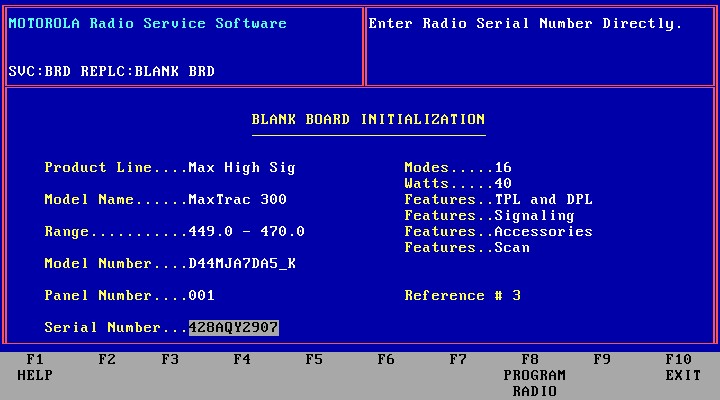
The manual makes a big deal out of initializing a radio and making sure you enter all of this information correctly. I quote:
"Once a non-initialized EEPROM is programmed with model definition data, it CANNOT be changed again. If the EEPROM is incorrectly initialized, the logic board will have to be replaced."
What this means is that you get one chance to enter the data on that once-only screen. Since it's never seen again, you're stuck with it. Nonsense! All you have to do is blank the board again and start over. However, not many facilities are equipped to do this, and Motorola realizes that. Therefore, replacing the board with another blank one is the only method they support in the field. You can blank and reinitialize a logic board almost indefinitely (there are probably limitations but I don't think we'll ever reach them in our lifetime).
NOTE: It's important to realize that there are differences between the various logic boards and firmware, and some combinations of these, along with certain Model Series and Product Names, just will not result in a working radio. In particular, 16-pin logic boards are usually capable of every possible choice, if they have the 32-channel firmware. 5-pin logic boards often can't handle Signaling or Accessories (choices you'll see shortly). If, while you're going through the various initialization screens (after the once-only screen with the Panel Number), the radio emits a "beep-boop" sound after you exit each screen, something is wrong and you should blank the radio again and choose another combination of parameters that results in less capabilities. The radio should only make a single "beep" sound as you exit each screen. If you DO go all the way through and finish everything and program frequencies into the radio, it will NOT transmit via the MIC jack, another indication that something is terribly wrong.
Specific field values:
OK, so you've gotten to this point and want to choose the Product Line. The software knows about more values than are presented to you on the screen; they're all shown in the following table, but you will only be able to choose from a subset of this list. Those values are marked with "Y" in the "You" column. This list is presented in order of the index number.
Product Lines
# Program Values You
0 Standard Y
1 Radius Y
2 MaxTrac Y
3 Trunked Y
4 Voice_Reporter Y
5 Flexar_fill
6 Radius_Int'l
7 RadiusReporter
8 Flex Indirect
9 Rad Low Sig
10 Max Low Sig
11 Rad I Low Sig
12 Rad High Sig
13 Max High Sig Y
14 Rad I High Sig
15 Max Options Y
16 Rad Options
17 Max Trk Option Y
18 Rad I Option
19 Radius Trunked
20 DeskTrac Rptr Y
The next field describes the Model Name or series. Sometimes a label on the radio's control head will match what you see in this list. Again, there are more values stored in the program than are presented to you on the screen, and only specific ones show up based on the Product Line. I have extracted all of the names from the program and shown the possibilities based on the product lines that were available to me. The numbers in the column headers refer to the Product Line index numbers above. The left-most column relates the model name to the model number.
Model Names or Radio Series
# Program Values 0 1 2
3 4 13 15 17 20
0 Radius M100 Y
Y
1 Radius M206
2 Radius M214
3 VR100
Y
4 VR100 TRUNKED
Y
5 MaxTrac 50
Y Y
Y
6 MaxTrac 100 Y
Y
Y Y
7 MaxTrac 300 Y
Y
Y Y Y
8 MaxTrac 820 Y
Y
Y
9 MaxTrac 840 Y
Y
Y
10 Privacy Plus Y
Y
Y
11 VR100
Y
12 VR100 Trunked
Y
13 Dual Mode
14 Smartnet 840
Y
Y
15 Radius M100 I
16 Radius M214 I
17 Radius M206 I
18 P. Plus 250
19 P. Plus 750
20 Smartnet 2000
Y
21 Smartnet C3
Y
22 Smartnet C5
Y
23 Radius M800
24 Radius M805
25 MaxTrac 25
Y
The list of possible Frequency Ranges is rather short. The program limits you to a bit narrower range than the radio may actually be capable of. Usually you will get a warning message if you exceed these limits. The first column is an index value used by the Model Number entries. The following list is ordered by the index number. Frequencies are in MHz.
Frequency Ranges or Bands
# Program Limit Radio Limit
0 150.8-162.0 136.0-165.0
1 450.0-470.0 439.0-471.0
2 136.0-162.0 134.0-165.0
3 146.0-174.0 143.0-176.0
4 403.0-430.0 401.0-440.0
5 449.0-470.0 439.0-471.0
6 470.0-500.0 470.0-500.0
7 494.0-520.0 494.0-520.0
8 0.0- 0.0
0.0- 0.0
9 806.0-870.0 805.0-871.0
10 896.0-941.0 895.0-942.0
11 0.0- 0.0
0.0- 0.0
12 29.6- 36.0
29.0- 37.0
13 36.0- 42.0
35.0- 43.0
14 42.0- 50.0
41.0- 54.0
The model entries specify the Model Names, Model Numbers, frequency band (range), number of modes, transmitter power, and options capabilities. The following table was extracted from the MaxTrac program; it is presented in the order in which it occurs. (There is additional information - not shown here - that specifies the various features the particular radio will have.) Note that only a small subset of these models will be made available for you to choose from, based on the Frequency Range (band), Model Name, and Product Line choices. You may have to go back and make different choices to see what model numbers and features are available. This is your only chance to pick a model number that has the highest number of modes. Some logic boards can hold more modes than others, and RSS does not know about this limitation at this stage in the process. In the table below, the columns contain the following information:
Model Numbers and Operating Parameters
Program Values MNI FRI
Modes Power
D33MJA73A5_K 6 2
2 25
D33MJA73A5_K 6 3
2 25
D34MJA73A5_K 6 4
2 25
D34MJA73A5_K 6 5
2 25
D43MJA73A5_K 6 3
2 45
D44MJA73A5_K 6 4
2 40
D44MJA73A5_K 6 5
2 40
D35MJA73A5_K 6 9
2 15
D33MJA7DA5_K 7 2
16 25
D33MJA7DA5_K 7 3
16 25
D34MJA7DA5_K 7 4
16 25
D34MJA7DA5_K 7 5
16 25
D43MJA7DA5_K 7 3
16 45
D44MJA7DA5_K 7 4
16 40
D44MJA7DA5_K 7 5
16 40
D35MJA7DA5_K 7 9
16 15
D45MJA7DA5_K 7 9
16 35
D33MJA7DA2_K 7 2
6 25
D33MJA7DA2_K 7 3
6 25
D34MJA7DA2_K 7 4
6 25
D34MJA7DA2_K 7 5
6 25
D43MJA7DA2_K 7 3
6 45
D44MJA7DA2_K 7 4
6 40
D44MJA7DA2_K 7 5
6 40
D33MJA77A3_K 7 2
6 25
D33MJA77A3_K 7 3
6 25
D34MJA77A3_K 7 4
6 25
D34MJA77A3_K 7 5
6 25
D43MJA77A3_K 7 3
6 45
D44MJA77A3_K 7 4
6 40
D44MJA77A3_K 7 5
6 40
D35MJA77A3_K 7 9
6 15
D35MJA73A6_K 6 9
2 15
D35MJA7DA6_K 7 9
16 15
D35MJA77A4_K 7 9
6 15
D35MQA5GB5_K 8 9
0 15
D35MQA5GB3_K 8 9
0 15
D35MWA5GB5_K 9 9
0 15
D35MWA5GB6_K 9 9
0 15
D35MQA5GB4_K 8 9
0 15
D35MWA5GB7_K 9 9
0 15
D35MQA5GB1_K 8 9
0 15
T25CPA5G05_H 10 9
0 10
T25CPA5G16_H 10 9
0 10
D33LRA7304_K 0 2
2 25
D33LRA1304_K 0 2
2 25
D34LRA1304_K 0 5
2 25
D33LRA7304_K 0 0
2 25
D34LRA7304_K 0 1
2 25
D33LRA1304_K 0 0
2 25
D34LRA1304_K 0 1
2 25
D33MJA73A5_K 6 2
2 25
D33MJA73A5_K 6 3
2 25
D34MJA73A5_K 6 4
2 25
D34MJA73A5_K 6 5
2 25
D03MJA73A5_K 6 3
2 2
D04MJA73A5_K 6 5
2 2
D43MJA73A5_K 6 3
2 45
D44MJA73A5_K 6 4
2 40
D44MJA73A5_K 6 5
2 40
D35MJA73A5_K 6 9
2 15
D45MJA73A5_K 6 9
2 35
D33MJA7DA5_K 7 2
16 25
D33MJA7DA5_K 7 3
16 25
D34MJA7DA5_K 7 4
16 25
D34MJA7DA5_K 7 5
16 25
D03MJA7DA5_K 7 3
16 2
D04MJA7DA5_K 7 5
16 2
D43MJA7DA5_K 7 3
16 45
D44MJA7DA5_K 7 4
16 40
D44MJA7DA5_K 7 5
16 40
D35MJA7DA5_K 7 9
16 15
D45MJA7DA5_K 7 9
16 35
D33MJA7DA2_K 7 2
6 25
D33MJA7DA2_K 7 3
6 25
D34MJA7DA2_K 7 4
6 25
D34MJA7DA2_K 7 5
6 25
D43MJA7DA2_K 7 3
6 45
D44MJA7DA2_K 7 4
6 40
D44MJA7DA2_K 7 5
6 40
D03MJA7DA2_K 7 3
6 2
D04MJA7DA2_K 7 5
6 2
D33MJA77A3_K 7 2
6 25
D33MJA77A3_K 7 3
6 25
D34MJA77A3_K 7 4
6 25
D34MJA77A3_K 7 5
6 25
D43MJA77A3_K 7 3
6 45
D44MJA77A3_K 7 4
6 40
D44MJA77A3_K 7 5
6 40
D03MJA77A3_K 7 3
6 2
D04MJA77A3_K 7 5
6 2
D35MJA77A3_K 7 9
6 15
D45MJA77A3_K 7 9
6 35
D35MJA73A6_K 6 9
2 15
D45MJA73A6_K 6 9
2 35
D35MJA7DA6_K 7 9
16 15
D45MJA7DA6_K 7 9
16 35
D35MJA77A4_K 7 9
6 15
D45MJA77A4_K 7 9
6 35
D33MJA7304_K 5 2
2 25
D33MJA7304_K 5 3
2 25
D34MJA7304_K 5 4
2 25
D34MJA7304_K 5 5
2 25
D43MJA7304_K 5 3
2 45
D44MJA7304_K 5 4
2 40
D44MJA7304_K 5 5
2 40
D51MJA9DA5_K 7 12
32 60
D51MJA9DA5_K 7 13
32 60
D51MJA9DA5_K 7 14
32 60
D33MJA1301_K 25 3
2 25
D34MJA1301_K 25 5
2 25
D33MJA7301_K 25 3
2 25
D34MJA7301_K 25 5
2 25
D53MJA7DA5_K 7 3
16 60
D35MJA7304_K 5 9
2 15
D45MJA7304_K 5 9
2 35
D33MJA1304_K 5 3
2 25
D34MJA1304_K 5 5
2 25
D43MJA1304_K 5 3
2 45
D44MJA1304_K 5 5
2 40
D51MJA9DA5_K 7 12
16 60
D51MJA9DA5_K 7 13
16 60
D51MJA9DA5_K 7 14
16 60
D51MJA97A3_K 7 12
6 60
D51MJA97A3_K 7 13
6 60
D51MJA97A3_K 7 14
6 60
D51MJA93A5_K 6 12
2 60
D51MJA93A5_K 6 13
2 60
D51MJA93A5_K 6 14
2 60
D35MJA73A6_K 6 9
2 15
D45MJA73A6_K 6 9
2 35
D35MJA7DA6_K 7 9
16 15
D45MJA7DA6_K 7 9
16 35
D35MJA77A4_K 7 9
6 15
D45MJA77A4_K 7 9
6 35
D03MJA7304_K 5 3
2 2
D04MJA7304_K 5 5
2 2
D33MJA7JA5_K 7 2
32 25
D33MJA7JA5_K 7 3
32 25
D34MJA7JA5_K 7 4
32 25
D34MJA7JA5_K 7 5
32 25
D34MJA7JA5_K 7 6
32 25
D34MJA7JA5_K 7 7
32 25
D03MJA7JA5_K 7 3
32 2
D04MJA7JA5_K 7 5
32 2
D43MJA7JA5_K 7 3
32 45
D44MJA7JA5_K 7 4
32 40
D44MJA7JA5_K 7 5
32 40
D35MJA7JA6_K 7 9
32 15
D45MJA7JA6_K 7 9
32 35
D35MQA5GB5_K 8 9
0 15
D45MQA5GB5_K 8 9
0 35
D35MQA5GB3_K 8 9
0 15
D45MQA5GB3_K 8 9
0 35
D35MWA5GB5_K 9 9
0 15
D45MWA5GB5_K 9 9
0 35
D35MWA5GB6_K 9 9
2 15
D45MWA5GB6_K 9 9
2 35
D35MQA5GB4_K 8 9
1 15
D45MQA5GB4_K 8 9
1 35
D35MWA5GB7_K 9 9
10 15
D45MWA5GB7_K 9 9
10 35
D35MQA5GB1_K 8 9
0 15
D45MQA5GB1_K 8 9
0 35
T25CPA5G05_H 10 9
0 10
T25CPA5G16_H 10 9
0 10
D35MWA5GC0_K 14 9
10 15
D45MWA5GC0_K 14 9
10 35
T25CPA5G43_H 10 9
0 10
T25CPA5G44_H 10 9
0 10
T35CPA5GB6_H 10 9
0 25
T35CPA5GB5_H 10 9
0 25
T35CPA5GB3_H 10 9
0 25
T35CPA5GB2_H 10 9
0 25
T35CPA5GC6_H 20 9
0 25
H5033 8 9
5 15
H1136B 11 2
2 25
H1136B 11 3
2 25
H1138B 11 4
2 25
H1138B 11 5
2 25
H1139B 11 9
2 15
H5011A 12 9
2 15
H1134B 11 12
2 60
H1134B 11 13
2 60
H1134B 11 14
2 60
D33MJA73A5_K 6 2
2 25
D33MJA73A5_K 6 3
2 25
D34MJA73A5_K 6 4
2 25
D34MJA73A5_K 6 5
2 25
D43MJA73A5_K 6 3
2 45
D44MJA73A5_K 6 4
2 40
D44MJA73A5_K 6 5
2 40
D35MJA73A5_K 6 9
2 15
D45MJA73A5_K 6 9
2 35
D33MJA7DA5_K 7 2
16 25
D33MJA7DA5_K 7 3
16 25
D34MJA7DA5_K 7 4
16 25
D34MJA7DA5_K 7 5
16 25
D03MJA7DA5_K 7 3
16 2
D04MJA7DA5_K 7 5
16 2
D43MJA7DA5_K 7 3
16 45
D44MJA7DA5_K 7 4
16 40
D44MJA7DA5_K 7 5
16 40
D35MJA7DA5_K 7 9
16 15
D45MJA7DA5_K 7 9
16 35
D33MJA7DA2_K 7 2
6 25
D33MJA7DA2_K 7 3
6 25
D34MJA7DA2_K 7 4
6 25
D34MJA7DA2_K 7 5
6 25
D43MJA7DA2_K 7 3
6 45
D44MJA7DA2_K 7 4
6 40
D44MJA7DA2_K 7 5
6 40
D33MJA77A3_K 7 2
6 25
D33MJA77A3_K 7 3
6 25
D34MJA77A3_K 7 4
6 25
D34MJA77A3_K 7 5
6 25
D43MJA77A3_K 7 3
6 45
D44MJA77A3_K 7 4
6 40
D44MJA77A3_K 7 5
6 40
D03MJA77A3_K 7 3
6 2
D04MJA77A3_K 7 5
6 2
D35MJA77A3_K 7 9
6 15
D45MJA77A3_K 7 9
6 35
D35MJA73A6_K 6 9
2 15
D45MJA73A6_K 6 9
2 35
D35MJA7DA6_K 7 9
16 15
D45MJA7DA6_K 7 9
16 35
D35MJA77A4_K 7 9
6 15
D45MJA77A4_K 7 9
6 35
D33MJA7304_K 5 2
2 25
D33MJA7304_K 5 3
2 25
D34MJA7304_K 5 4
2 25
D34MJA7304_K 5 5
2 25
D43MJA7304_K 5 3
2 45
D44MJA7304_K 5 4
2 40
D44MJA7304_K 5 5
2 40
D51MJA9DA5_K 7 12
32 60
D51MJA9DA5_K 7 13
32 60
D51MJA9DA5_K 7 14
32 60
D27MJA7DA6_K 7 10
16 12
D37MJA7DA6_K 7 10
16 30
D27MJA77A4_K 7 10
6 12
D37MJA77A4_K 7 10
6 30
D27MJA73A6_K 6 10
2 12
D37MJA73A6_K 6 10
2 30
D27MJA73A5_K 6 10
2 12
D37MJA73A5_K 6 10
2 30
D35MJA7304_K 5 9
2 15
D45MJA7304_K 5 9
2 35
D33MJA1304_K 5 3
2 25
D34MJA1304_K 5 5
2 25
D43MJA1304_K 5 3
2 45
D44MJA1304_K 5 5
2 40
D51MJA9DA5_K 7 12
16 60
D51MJA9DA5_K 7 13
16 60
D51MJA9DA5_K 7 14
16 60
D51MJA97A3_K 7 12
6 60
D51MJA97A3_K 7 13
6 60
D51MJA97A3_K 7 14
6 60
D51MJA93A5_K 6 12
2 60
D51MJA93A5_K 6 13
2 60
D51MJA93A5_K 6 14
2 60
D35MJA73A6_K 6 9
2 15
D45MJA73A6_K 6 9
2 35
D35MJA7DA6_K 7 9
16 15
D45MJA7DA6_K 7 9
16 35
D35MJA77A4_K 7 9
6 15
D45MJA77A4_K 7 9
6 35
D03MJA7304_K 5 3
2 2
D04MJA7304_K 5 5
2 2
D33MJA7JA5_K 7 2
32 25
D33MJA7JA5_K 7 3
32 25
D34MJA7JA5_K 7 4
32 25
D34MJA7JA5_K 7 5
32 25
D03MJA7JA5_K 7 3
32 2
D04MJA7JA5_K 7 5
32 2
D43MJA7JA5_K 7 3
32 45
D44MJA7JA5_K 7 4
32 40
D44MJA7JA5_K 7 5
32 40
D35MJA7JA6_K 7 9
32 15
D45MJA7JA6_K 7 9
32 35
D33MJA73A5_K 6 2
2 25
D33MJA73A5_K 6 3
2 25
D34MJA73A5_K 6 4
2 25
D34MJA73A5_K 6 5
2 25
D43MJA73A5_K 6 3
2 45
D44MJA73A5_K 6 4
2 40
D44MJA73A5_K 6 5
2 40
D35MJA73A5_K 6 9
2 15
D45MJA73A5_K 6 9
2 35
D33MJA7DA5_K 7 2
16 25
D33MJA7DA5_K 7 3
16 25
D34MJA7DA5_K 7 4
16 25
D34MJA7DA5_K 7 5
16 25
D03MJA7DA5_K 7 3
16 2
D04MJA7DA5_K 7 5
16 2
D43MJA7DA5_K 7 3
16 45
D44MJA7DA5_K 7 4
16 40
D44MJA7DA5_K 7 5
16 40
D35MJA7DA5_K 7 9
16 15
D45MJA7DA5_K 7 9
16 35
D33MJA7DA2_K 7 2
6 25
D33MJA7DA2_K 7 3
6 25
D34MJA7DA2_K 7 4
6 25
D34MJA7DA2_K 7 5
6 25
D43MJA7DA2_K 7 3
6 45
D44MJA7DA2_K 7 4
6 40
D44MJA7DA2_K 7 5
6 40
D33MJA77A3_K 7 2
6 25
D33MJA77A3_K 7 3
6 25
D34MJA77A3_K 7 4
6 25
D34MJA77A3_K 7 5
6 25
D43MJA77A3_K 7 3
6 45
D44MJA77A3_K 7 4
6 40
D44MJA77A3_K 7 5
6 40
D03MJA77A3_K 7 3
6 2
D04MJA77A3_K 7 5
6 2
D35MJA77A3_K 7 9
6 15
D45MJA77A3_K 7 9
6 35
D35MJA73A6_K 6 9
2 15
D45MJA73A6_K 6 9
2 35
D35MJA7DA6_K 7 9
16 15
D45MJA7DA6_K 7 9
16 35
D35MJA77A4_K 7 9
6 15
D45MJA77A4_K 7 9
6 35
D33MJA7304_K 5 2
2 25
D33MJA7304_K 5 3
2 25
D34MJA7304_K 5 4
2 25
D34MJA7304_K 5 5
2 25
D43MJA7304_K 5 3
2 45
D44MJA7304_K 5 4
2 40
D44MJA7304_K 5 5
2 40
D51MJA9DA5_K 7 12
32 60
D51MJA9DA5_K 7 13
32 60
D51MJA9DA5_K 7 14
32 60
D27MJA77A4_K 7 10
6 12
D35MJA7304_K 5 9
2 15
D45MJA7304_K 5 9
2 35
D33MJA1304_K 5 3
2 25
D34MJA1304_K 5 5
2 25
D43MJA1304_K 5 3
2 45
D44MJA1304_K 5 5
2 40
D51MJA9DA5_K 7 12
16 60
D51MJA9DA5_K 7 13
16 60
D51MJA9DA5_K 7 14
16 60
D51MJA97A3_K 7 12
6 60
D51MJA97A3_K 7 13
6 60
D51MJA97A3_K 7 14
6 60
D51MJA93A5_K 6 12
2 60
D51MJA93A5_K 6 13
2 60
D51MJA93A5_K 6 14
2 60
D35MJA73A6_K 6 9
2 15
D45MJA73A6_K 6 9
2 35
D35MJA7DA6_K 7 9
16 15
D45MJA7DA6_K 7 9
16 35
D35MJA77A4_K 7 9
6 15
D45MJA77A4_K 7 9
6 35
D03MJA7304_K 5 3
2 2
D04MJA7304_K 5 5
2 2
D33MJA7JA5_K 7 2
32 25
D33MJA7JA5_K 7 3
32 25
D34MJA7JA5_K 7 4
32 25
D34MJA7JA5_K 7 5
32 25
D03MJA7JA5_K 7 3
32 2
D04MJA7JA5_K 7 5
32 2
D43MJA7JA5_K 7 3
32 45
D44MJA7JA5_K 7 4
32 40
D44MJA7JA5_K 7 5
32 40
D35MJA7JA6_K 7 9
32 15
D45MJA7JA6_K 7 9
32 35
D35MQA5GB5_K 8 9
0 15
D45MQA5GB5_K 8 9
0 35
D35MQA5GB3_K 8 9
0 15
D45MQA5GB3_K 8 9
0 35
D35MWA5GB5_K 9 9
0 15
D45MWA5GB5_K 9 9
0 35
D35MWA5GB6_K 9 9
2 15
D45MWA5GB6_K 9 9
2 35
D35MQA5GB4_K 8 9
1 15
D45MQA5GB4_K 8 9
1 35
D35MWA5GB7_K 9 9
10 15
D45MWA5GB7_K 9 9
10 35
D35MQA5GB1_K 8 9
0 15
D45MQA5GB1_K 8 9
0 35
T25CPA5G05_H 10 9
0 10
T25CPA5G16_H 10 9
0 10
D35MWA5GC0_K 14 9
10 15
D45MWA5GC0_K 14 9
10 35
T25CPA5G43_H 10 9
0 10
T25CPA5G44_H 10 9
0 10
D35MWA5GC3_K 21 9
8 15
D45MWA5GC3_K 21 9
8 35
D35MWA5GC5_K 22 9
8 15
D45MWA5GC5_K 22 9
8 35
D05MJA7DA5AK 7 9
1 10
D35MJA7DA5AK 7 9
1 10
To complete the initialization of my radio, I chose the following values. Note how the various index values are used to relate the eventual model number to the information in the table above:
D37MJA7DA6_K Radio
Field Name Chosen Value Index
Product Line Max High Sig 13
Model Name MaxTrac 300 7
Range 896.0-941.0 10
Model Number D37MJA7DA6_K
Modes 16
Watts 30
Features TPL and DPL
Features Signaling
Features Accessories
Features Talkaround
Features Scan
Each Product Line, Model Name, and Range can utilize or support any number of these features depending on the Model Number you choose. The list of possible features (encoded within the program) are shown below:
One final field on the initialization screen requires further discussion: the Panel Number. This describes the type of control head / control panel that the radio has attached to it. While there are several choices, the ones that most amateurs will have are quite limited. Either you have a 2-channel (mode) control head with two buttons and four LEDs (Panel # 000), or you have a multi-channel (mode) control head with 3-5 buttons, three LEDs, and two seven-segment LED displays (Panel # 001). The actual panel numbers can be found in the software Instruction Manual or by pressing F1 (Help) when your cursor is on this field. Here's the list extracted from the software manual and the help file:
# Product Line and/or Model Name Usage
0
All 2 frequency models: Radius M100, MaxTrac 25, MaxTrac 50, MaxTrac 100
Voice Reporter Models: H1135_, H1136_, H1138_, H1139_, H1134_
1 All 6, 16 and 32 frequency models: MaxTrac 300
2
All 6 frequency models with Signaling or Accessory Connector Option: MaxTrac 300
50 MaxTrac 820 Trunked: D__MQA5GB5_K, D__MQA5GB1_K
Privacy Plus 250/750: T_5CPA5G___H
51 MaxTrac 820 Trunked: D__MQA5GB3_K
52 MaxTrac 840 Trunked: D__MWA5GB5_K, D__MWA5GB6_K
53 MaxTrac 840 Trunked: D__MWA5GB7_K
54 MaxTrac 840 Trunked: D__MWA5GC0_K
55 Trunked Voice Reporter: H5011_
56 Maxtrac 820 Trunked: D__MQA5GB4_K
I have no idea what the difference is between Panel # 001 and Panel # 002. I've never seen a MaxTrac or Radius with an Accessory Connector Option. Panel # 001 works fine with any multi-channel control head. I have also seen additional panel numbers in other documentation and for other radio models; refer to the appropriate software manual for more information.
As Bruce KC7GR says, "Happy Tweaking!"
Acknowledgements and Credits:
Information was extracted from the program's files, help screens, and user's guide.
MaxTrac, Radius, and a bunch of other terms are trademarks of Motorola, Inc.
I wrote my own custom program to decode and print the entries in a MaxTrac Model Definition File. The full output of that program can be found here.
Contact Information:
The author can be contacted at: his-callsign [ at ] comcast [ dot ] net.
Back to the top of the page
Up one level (MaxTrac index)
Up two levels (Motorola index)
Back to Home
This page originally posted on Wednesday 01-Aug-2007
Article text, artistic layout, images, and hand-coded HTML © Copyright 2010 by Robert W. Meister WA1MIK.
This web page, this web site, the information presented in and on its pages and in these modifications and conversions is © Copyrighted 1995 and (date of last update) by Kevin Custer W3KKC and multiple originating authors. All Rights Reserved, including that of paper and web publication elsewhere.