|
Up one level (Motorola Index) Back to Home |
The Quantar / Quantro Station and
Astro-Tac Receiver Index Page Originally Compiled by Robert Meister WA1MIK (SK) Extinsively Added to by Michael Morris WA6ILQ. Currently Maintained by Michael Morris WA6ILQ. |
Mike has little hands-on experience with this equipment so please ask on the repeater-builder mailing list!
Contributions, comments / critiques / suggestions / corrections / updates for this page (or any page) are welcome and appreciated.
Actually that applies to any page at this web site! (even one that just points out a typo).
The Astro-Tac Receiver (sometimes referred to as the Astro-Tac or the Astro-Tac 3000) is essentially a standard Quantar receiver module and a Station Control Module (SCM) in a rack-mount box that is 2 Rack Units (3.5 inches) tall. The SCM might be a receive-only controller or might be a complete SCM, you can't tell by looking at it, you will have to download the codeplug and look. The Astro-Tac Receiver was originally designed as a voting receiver but showed up in a number of other roles.
Motorola also offered a Quantar Satellite Receiver product which is basically a Quantar chassis minus the Exciter and PA (blank panels in those slots). The advantage to this configuration is that it can be used where wildcard functions are need.
Here are some of the major differences between the Quantar and the Quantro:
The manufacturing nameplate on the Quantar chassis generally shows a Model T5365A along with the serial number. Astro-Tac receivers usually show T5367 or T5589. There is NO way to find out if that unit is VHF, UHF1, UHF2, UHF3, UHF4, 700, 800 or 900 MHz from the manufacturing plate without either inventorying the modules or by powering it up and using the CPS…
On a new-to-you Quantar you will have to pull the individual modules out of the chassis (you will need a T15 Torx™ screwdriver) and copy all of the (3 or 4 letters plus 4 or 5 numbers) part numbers off of the labels on the back of the modules, and then look them up to find out what you have. If the labels are missing then you will have to read the station with the CPS and make your list that way (and the labels may be different than what the CPS thinks they are). Then look at the known modules list sorted by number (there is another list linked below that is sorted by name).
However you can get some idea of what band the station is just by looking at the front of the receiver module:
The VHF and UHF Receivers are about 3.5 inches (8.9cm) wide, both will have five adjustment holes for the helical resonator front end adjustments. The 700 / 800 / 900 MHz receivers are half width, have no adjustment screws or holes and there is a adjacent blank panel of the same width. The VHF receivers have all five of the preselector adjustment screws visible (but you won't know if the receiver is a Range 1 (132-150 MHz or a Range 2 150-174 MHz).
The UHF receivers (like in the photo at the top of this page) have the same five holes but only the three middle holes have the preselector tuning screws visible, but again you won't know which range the receiver was made for… It could be a Range 0 (zero) (380-433 MHz), a Range 1 (408-433 MHz), a Range 2 438-470 MHz), a Range 3 (470-494 MHz) or a Range 4 494-520 MHz). The range 0 (zero) UHF receiver can be identified by an extended piece of metal out the front as the tuning slugs for that range are longer.
A VHF or UHF Quantar station usually has an empty slot between the SCM and the
receiver with a blank plate or it can contain:
1) a second recevier,
2) a Station Access Module (SAM) or
3) an Ultra High Stability Oscillator (UHSO or UHS) module.
I've never seen a VHF Quantar with a UHS module. Some UHF P25 systems used the UHS
module, I was told of one that shared the UHS module across (up to) 5 Quantars in one
5 foot tall rack. The UHS was very common on 800 and 900 MHz systems.
The Quantar / Quantro itself cannot be controlled by DTMF as there is no DTMF receiver chipset in the Station Control Module. The optional Station Access Module (SAM) added the ability to remote ly control the station by decoding DTMF strings, single‑tones, and MDC-1200 data allowing remotely enabling / disabling the repeater, changing access modes and more. I heard of one Quantar that normally operates in mixed mode and can be switched to P25 only (and then back to mixed) using MDC bursts. The Quantar SAM has its own standalone engineering manual (6881127E40 - anyone have a copy?) rather than just a chapter in the regular manual. There is, however, a "Field Programmer User Reference Manual" (6880309E35‑A) that will help you get started. SAMs are rare, and someone that is familiar with them is even more rare. In most cases a Quantar in amateur radio repeater service will not have a SAM and instead will be using an external controller.
Despite what you read elsewhere the Quantar / Quantro stations were never intended for GMRS. They are certainly capable, and can be set for the 50 watt transmit power limit, but Motorola never certified them for FCC Rule Part 95 (GMRS) service. See the FCC Designation information on page 22 of this file.
The published Quantar ranges are as follows:
VHF Range 1: 132‑154 MHz.
VHF Range 2: 146‑174 MHz. This range will work down to 144 MHz.
UHF Range 0, 380‑433 MHz This range was added last (chronologically).
UHF Range 1, 403‑433 MHz
UHF Range 2, 438‑470 MHz
UHF Range 3, 470‑494 MHz TV channel 14 is 470‑476, 15 is 476‑482, 16 is 482‑488, 17 is 488‑494.
UHF Range 4, 494‑520 MHz TV channel 18 is 494‑500, 19 is 500‑506, 20 is 506‑512, 21 is 512‑518, 22 is 518‑524.
800 MHz: RX on 806‑825 MHz, TX on 851‑870 MHz
900 MHz, RX on 896‑902 MHz, TX on 935‑941 MHz The RX upper limit can be hexedited to go above 902 MHz and the TX lower limit can be hexedited down to 927 MHz.
Motorola made a kit of two brackets (0785412U01) that would center the Quantar (front-to-back) on a two-post rack. (opens in a new browser tab)
The cable that links the exciter to the RF PA Module is the part number 3082134X01 or 3082134X01A.
The rear of the chassis has a grounding boss for the attachment of a ground cable. The part that was shipped with the Motorola Quantro/Quantar Radio Repeater/Base station kit was the Ground Lug and Set Screw
Receiver Notes:
The front of the VHF receivers have the five holes and five preselector tuning screws. The UHF receivers have the same five holes but only the three middle holes have the tuning screws visible.
The spec sheet says that the receiver front ends are 4 MHz wide on VHF and 6 MHz wide on UHF.
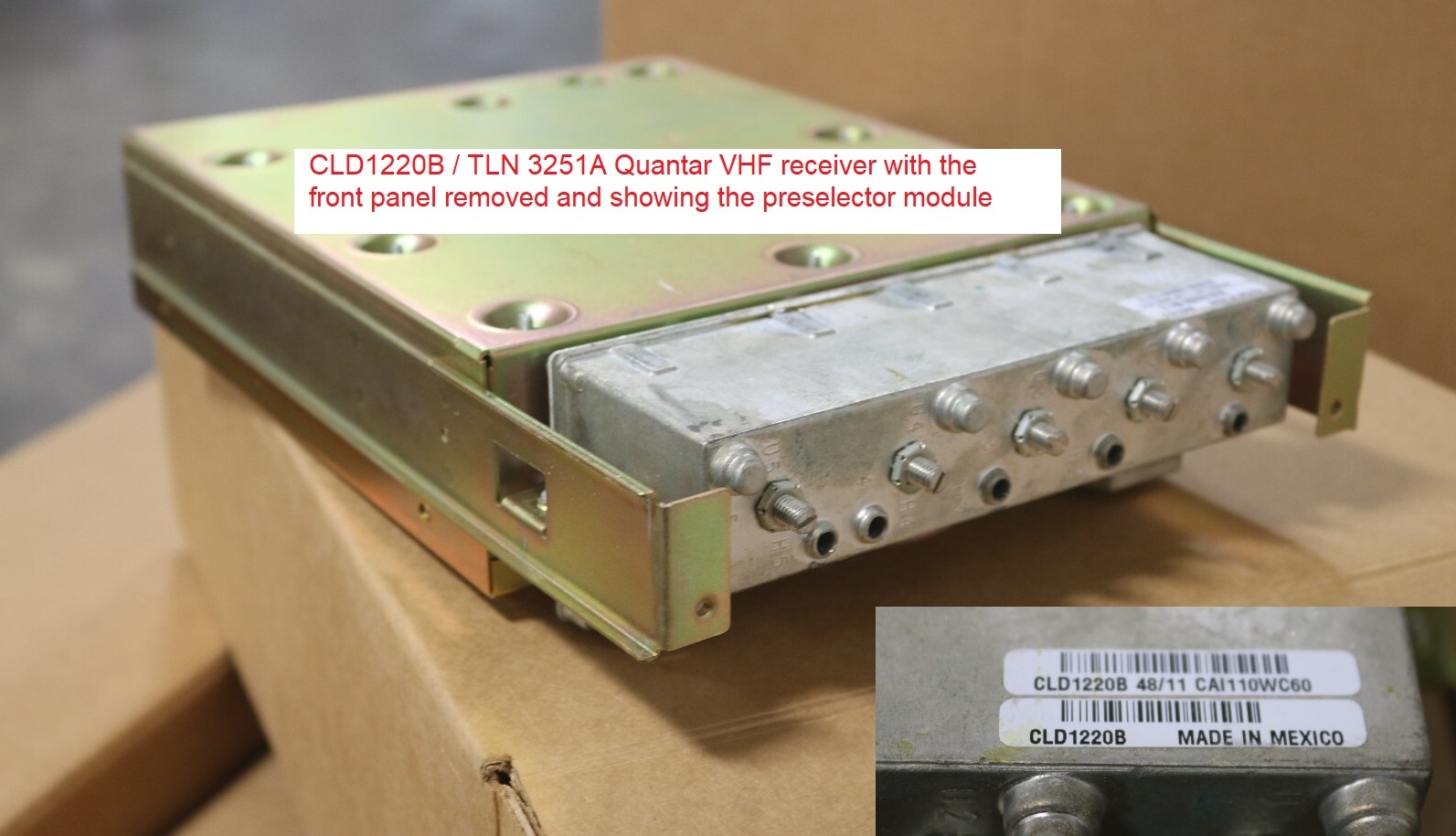
Here's a photo of a VHF receiver module with the front sheet metal panel missing. The preselector modules are the same as the ones used in the MTR2000 / MTR3000 stations.
The 380-433 MHz) range 0 (zero) UHF receiver can be identified by an extended piece of metal out the front as the tuning slugs for that range are longer.
The Quantar / Quantro receiver module does not have a discriminator output. The receiver module presents the recovered audio / data as two separate digital byte streams to the Station Control Module (SCM). Some digital magic inside the SCM recovers the audio or data.
Programming:
Don't forget the first rule of radio programming - any make and any model: Always
read the radio first! If you can't read it then DON'T WRITE TO IT. A succesful read
says that you have the correct COM port, the correct cable and tells you have the correct
programming software for your make and model of radio. And be aware that there are
model numbers that have multiple software packages, for example there can be one
hardware package that uses one software package for the USA region firmware, a second
software package for the european region firmware, and a third for the regions that use
the MPT protocol firmware.
And on a new-to-you radio always save that first download file (with the commercial frequencies that were in it) and archive it in case of future problems. And I'd save your tuning data as well (how that is done varies with the manufacturer and with the product line and radio model). If you screw up later on then having those original file(s) allows you to backstep and restore the station back to where you started and you can try again. Just save the downloaded code plug and the tuning data on your hard drive and use the station serial number as the file name. It's much better to waste a few kilobytes of hard drive space (or CD space) saving a known good original codeplug on a backup that you may never need than to need a backup you don't have and will never be able to get.
You'll need the RVN5002 "WinRSS" to progam the Quantar and Quantro stations and the Astro-Tac.
Like the R1225 and the MTR2000 / 3000 the Quantar RVN5002 software will not run on 64-bit Windows.
Also, the later versions locked you into narrowband unless you had an entitlement key (and as far as I know those
are no longer available). Revisions 09.07.00, 14.08.01, 14.10.00 (manual is dated June 2011), 14.11.00 are
"out there" however 14.12.00 is the one that you want to look for. Anything later forced the unit
into narrowband. The final version was R14.13.00 (dated April 2015).
If any additional information is received I'll add it here.
You program the Quantar through the 9‑pin female connector (DE‑9 / DB‑9) on the front of the station control module (SCM). The programming cable is Motorola's part number 30‑80369E31 or E32 but you can make one yourself, no RIB is used, it it a simple null-modem connection and has a DB‑25 (25-pin female) or DE‑9 (9-pin female) on the computer end and a DE‑9 (nine-pin male) on the Quantar end:
Computer end    |    Computer end  | data |   Quantar end
25 pin female   |    9 pin female  | flow |   9 pin male
                |
     3 ---------------- 2 ------------>>>-------- 3
     2 ---------------- 3 ------------<<<-------- 2
     7 ---------------- 5 ------------GND-------- 5
     4 ---------------- 7 ------------>>>-------- 8
     5 ---------------- 8 ------------<<<-------- 7
                |                  |
In most cases pins 7 and 8 won''t be needed... all that you will need
is a three-conductor "null modem" connection (pins 2, 3
and 5) (with pins 2 and 3 swapped on one end).
Both ends have no connection on pins 1, 4, 6, and 9.You can help to minimize the number of cables you have to keep in your radio programming laptop computer bag... This FTDI-based USB to DE-9 adapter works with the stock Windows drivers along with a Null Modem adapter and a 3-wire extension cord. Or you can make your own universal cable with a DE-9 maleconnector, a DE-9 female connector and a length of 3-conductor cable. Just find a tiny 2PDT toggle switch that fits inside on eof the 9-pin cable shells. Then wire it so that in one position it's a 2-3-5 straight through extension cable and the other position 2-3 are swapped for a simple null-modem connection. Or use a 4PDT toggle switch and swap 7-8 also. Label the switch as "Extension" and "Null" (or "Extension" and "Quantar").
You will need to tune the receiver preselector for optimum performance. The VHF preselector is a 5-pole bandpass filter and the UHF is a 3-pole and were originally designed for and used in the MTR2000 / MTR3000 stations. Both the VHF and UHF preselectors are about 4 MHz wide. For data completeness sake the 800 MHz preselectors are about 18-19 MHz wide and the 900 MHz ones are about 6 MHz wide.
The preselector tuning information is in Section 5 of
the Motorola Quantar
Instruction Manual 68P81095E05 Part 4, (opens in a new browser tab)
The information is on the PDF is page 41 or the paper page 38).
Note the warning in the Motorola documentation that tuning for best SINAD response
DOES NOT result in optimum tuning of the preselector assembly. Supposedly you must
use the field tuning procedure in the manual to obtain optimum preselector performance.
Power Supplies:
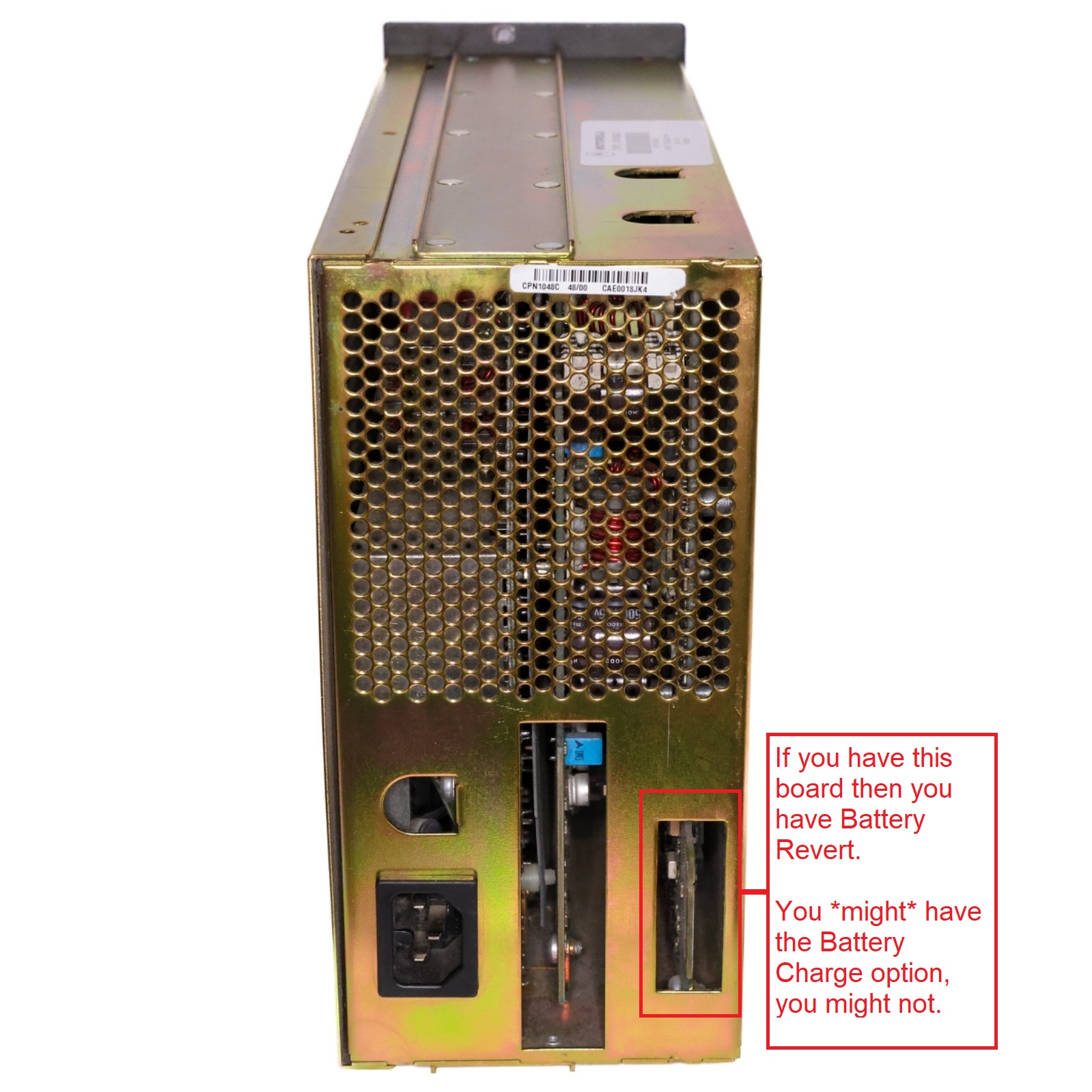
There are a number of Quantar power supply modules… They come in three generic versions (and a couple of sub-versions):
Battery Revert was was not a specifically listed option on the early
Quantar / Quantro station order forms. It was added later
as Option X30. The hardware portion of the option consists of a
different power supply module and adding both a TRN5155A cable kit
(to connect the Quantar to the battery terminals ) and a TKN8786A
Battery Temperature Sensor Cable and then you made some changes
in the station programming. The battery connection kit was the same
as used with the DC input supplies.
More below in Note 3.
A station ordered with a non-Battery Revert AC supply had a blank cover
plate (part number 1582596Y01) over Connector #25 covering the hole to keep
the mice and otehr nasties out.
A station ordered with a Battery Revert AC supply or a DC input supply had a
cable kit installed in Connector #25 position to connect to the DC source or
battery bank.
NOTE THE BATTERY POLARITY STAMPED INTO THE QUANTAR REAR SHEET METAL.
The DC / battery connection is ground independent (i.e. can be
wired as floating, as negative ground or as positive ground).
No matter which power supply module in installed the Quantar station internally works on 14 volts and 5 volts. The high power PA runs on 28 volts at about 12 to 13 amps. The low power PA runs on the 14 volt output of the power supply. The low power stations (25 to 50 watts) use a 12 volt to 14 volt DC supply or battery bank configuration. The high power stations (100, 110 and 125 watts) connect to a 24-28 volt battery.
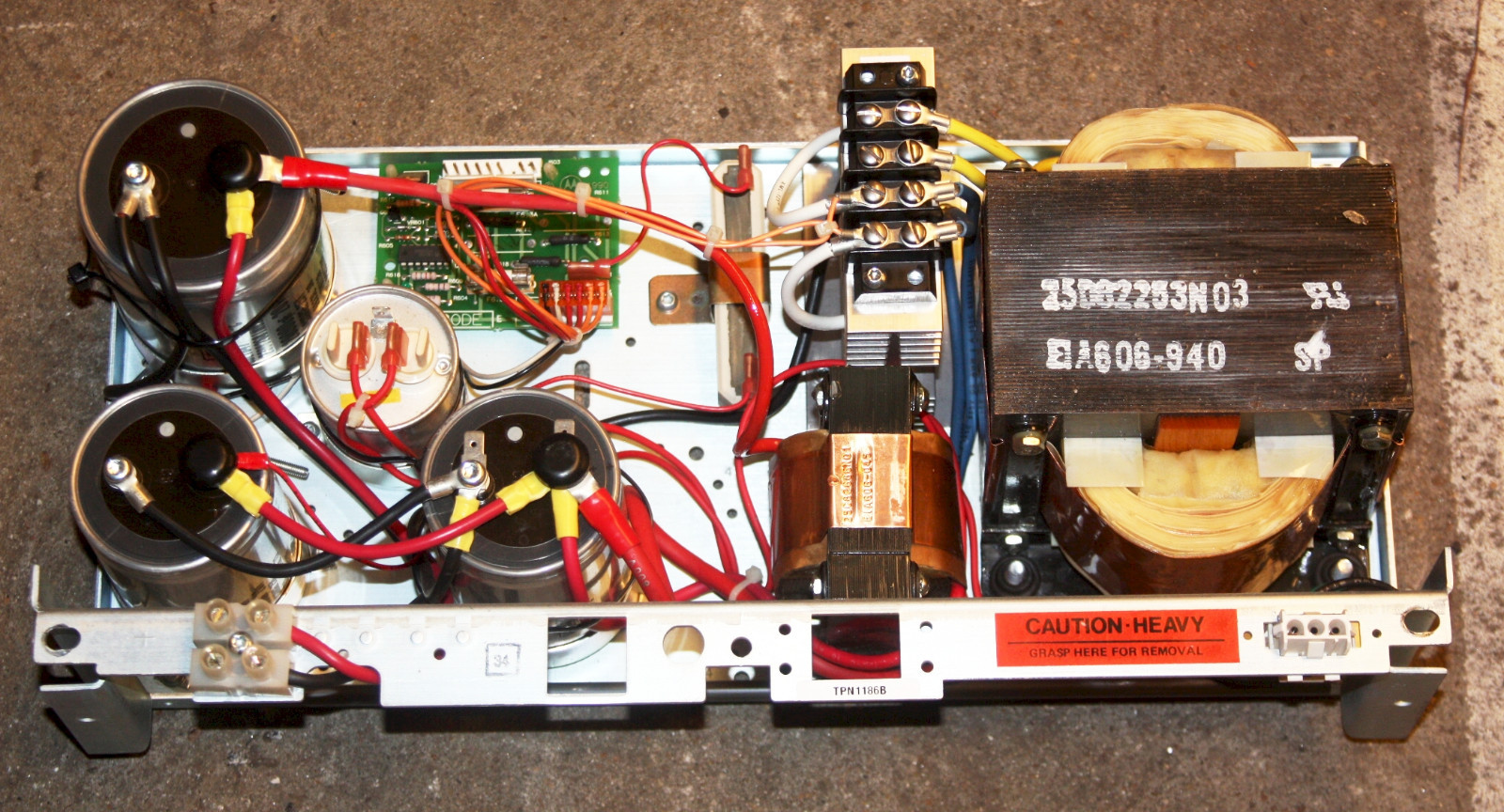
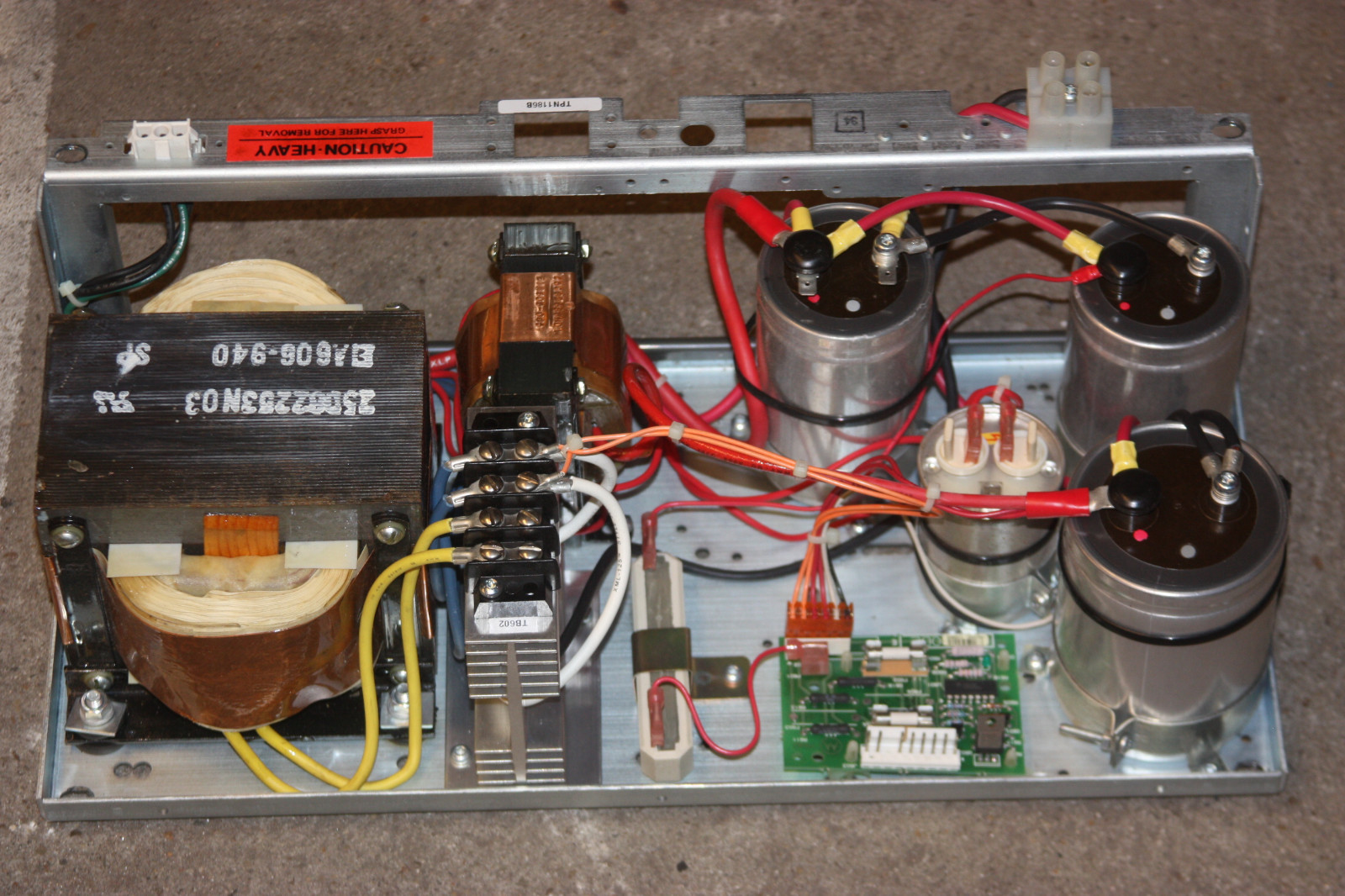
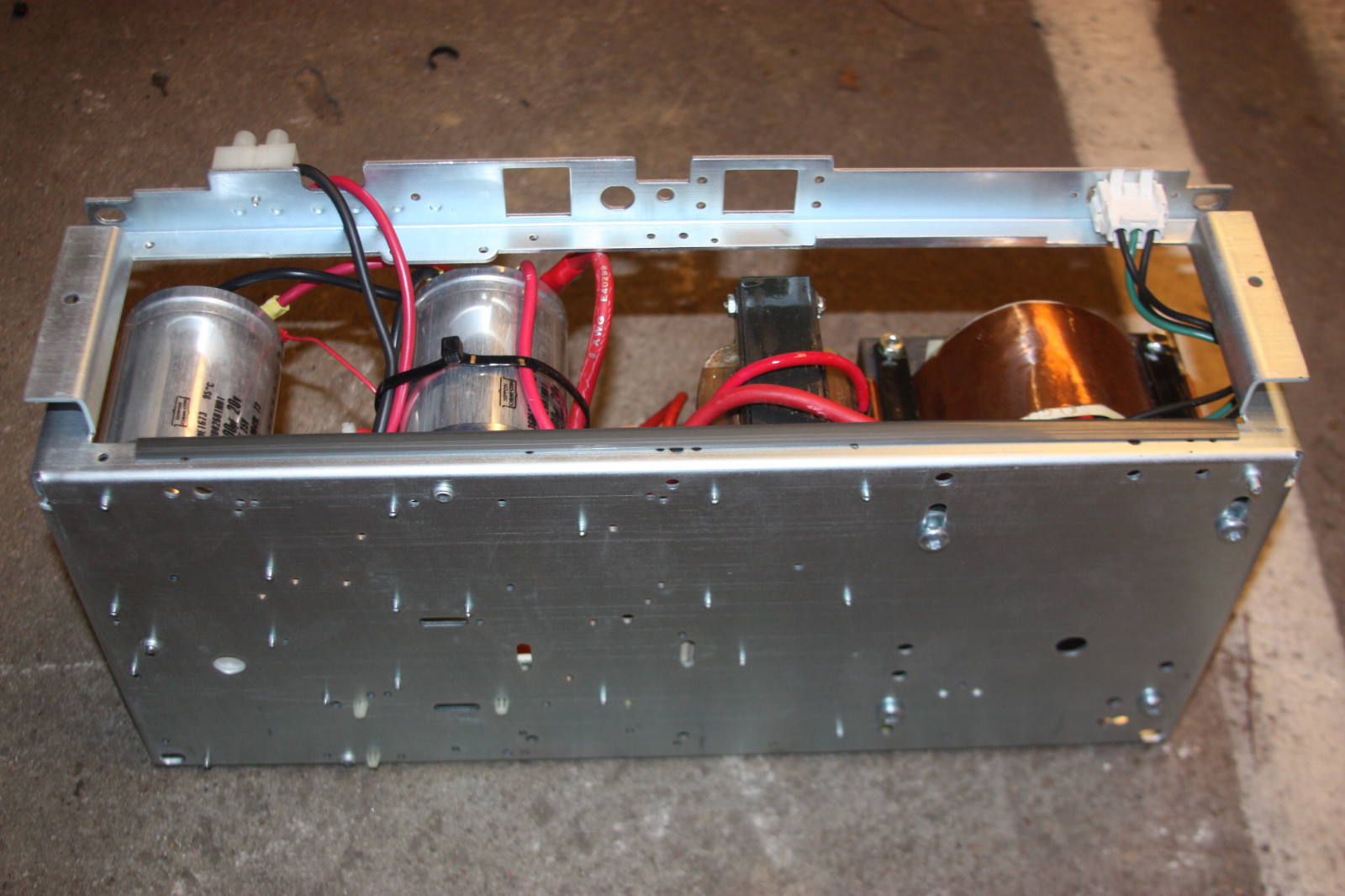
One of the Motorola Quantro rack-mounted power supplies is the TPN1186B...
originally spec'd for the MSF5000 station.
It is rated at 14 volts and 35 amps continuous duty and weighs
about 50 pounds.
Photo 1
Photo 2
Photo 3
| Quantar Power Supplies Comparison | ||||||
|---|---|---|---|---|---|---|
| Part Numbers | Power Input1 |
Manufacturer2 | Battery Revert / Battery Charger3 |
Watts4 | Other | |
| OEM | FRU | |||||
| CPN1031 | TLN3377 | 43/62v DC at up to 22 amps | Motorola | N/A | 600 | Output: +28.6v at 12.5a, +14.2v at 8a and +5.0v at 3A |
| CPN1041 | ? | AC | Onan | ? | 700 | |
| CPN1042 | ? | AC | Onan | ? | 700 | |
| CPN1047 | TLN3259 | AC | Motorola | No | 625 | Output: +28.6v at 12.5a, +14.2v at 8a and +5.1v at 3a |
| CPN1048 | TLN3260 | AC | Motorola | Yes | 625 | Output: +28.6v at 12.5a, +14.2v at 8a and +5.1v at 3a |
| CPN1049 | TLN3261 | AC | Motorola | No | 265 | Output: +14.2v at 12.5a and +5.1v at 9a |
| CPN1050 | TLN3262 | AC | Motorola | Yes | 265 | Output: +14.2v at 12.5a and +5.1v at 9a |
| ? | TPN6184 | AC | Motorola | ? | 625 | |
| ? | TPN6185 | AC | Motorola | Yes | 625 | |
| TRN7801 | TLN3263 | 21.0-34.5vDC at up to 40 amps (24vDC) | Onan | N/A | 600 | Output: +28.6v at 16a, +14.2v at 9a and +5.1v at 9a |
| TRN7802 | TLN3264 | 10.5-34.5vDC at up to 8.5 amps (12 or 24v DC) | Onan | N/A | 210 | Output: +14.2v at 12.5a and +5.1v at 9a |
| TRN7803 | TLN3378 | 41-72vDC at up to 8.5 amps | Onan | N/A | 210 | Output: +14.2v at 12.5a and +5.1v at 9a |
And that leads me into the next paragraph...
The Battery Revert feature includes a built-in under-voltage battery protection circuitry (low voltage disconnect)
which triggers when the battery voltage drops to 10.75 volts (one manual says 10.5 volts) or 21 volts
on the high power stations. This disconnect protects the battery from fatal over-discharge.
The Battery Revert power supplies have a charger and that should not be considered as the primary battery charger, they
are essentially a trickle charger. For sites with frequent AC Mains power interuptions Motorola recommends an
external battery charging system based on a switch-mode charger made by Argus Technologies in Britsh Columbia,
Canada.
The MTR page at this web site has some Argus information that might be useful.
(all of the links in this paragraph are off-site pointers, all open in new browser tabs)
The DC input connector that mounts in location 25 is an AMP/TE 530521-3 four position (8 contact) connector body. The contacts are
AMP/TE 5-530519-2.
Both Digikey and Mouser stock the pieces: Digikey's page for the connector body and the pins. Mouser pointers: body and pins. I could not find the plastic key (or tab) at either Digikey or Mouser but you could easily make one, perhaps by cutting a piece out of an old credit card or some other piece of sheet plastic.
The screws that fasten the connector into the back of the Quantar chassis are 3.5mm diameter and 12mm long.
Well, 3.5mm is NOT stocked at any hardware store near me (they had 3mm and 4mm) or at Home Depot or Lowes.
But they had them on Amazon....
https://www.amazon.com/dp/B07KY8H26C.
Yes, it's 10 pieces and they are Torx but it's the correct length and size... and at $8 it was cheaper than ordering a smaller quantity at a higher price from an internet hardware supplier and I already had the correct Torx driver in the set from when I first got started in Maxtracs.
The TKN8786A Battery Temperature Sensor Cable plugs into the 3-pin conector at connector
location 24 (adjacent to the Battery Revert connector). Unfortunately as of late 2025 that
Sensor Cable is no longer available from Motorola Parts. That cable is a small diameter grey cable
that terminates in a length of black heat-shrink. Inside / under that heat shrink is a
thermistor. The idea is that you would place the thermistor in direct contact with the battery so that
it measures the battery temperature, and that information would let the battery charger board inside
the power supply module adjust the charging current and voltage. An acquantance said that he's seen
the thermistor duct-taped to the negative post of a battery instead of to the plastic case of the battery...
the idea is that due to thermal conduction the metal post would be closer to the internal termperature
of the battery than the outside of the plastic case would be.
Any additional details that would help someone replicate the TRN5155A or TKN8786A cables would
be welcome....
Motorola says this about the X30 option "Battery Charger and Emergency Reverting":
Provides an adjustable, regulated power supply to trickle charge a battery, and automatically reverts to battery operation upon loss of primary power. This option is not recommended in situations of frequent AC power interruptions, due to the limited recharge capability of the Quantar / Quantro power supply. This option is not available on 350 watt models.
External storage batteries attach to the station through the battery connector at location 25 on the backplane. Includes a low voltage disconnect feature, which disconnects at 10.5 volts for 12 volt batteries, and 21 volts for 24 volt batteries. The Quantar requires 12 volt batteries for 20 and 25 watt models and only 24 volt batteries for 100, 110 and 125 watt models.
Note: Output power may be reduced up to 3dB in the battery revert mode to conserve battery life. Full rated RF power is only available for terminal voltages of 13.5 to 15 volts (12 VDC: X30 option) and 27 to 30 volts (24 VDC: X30 option) at the station DC input connector.
The Test Handset (or Microphone):
The front of the Quantar SCM control module has a tiny internal speaker fed by a low power audio amplifier, which has just enough audio output to feed the speaker and to deliver a line level output to the earpiece of the test handset and also to the external speaker jack on the front.
The Volume Up and Volume Down buttons on the front of the control module provide 16 levels of volume on to the test handset / microphone jack and both the internal and external speakers. Depressing the Volume Down button for two seconds shuts the local speaker off. Momentarily depressing the Volume Up button turns the speaker on.
The SCM also has two modular connectors on the front for the test handset (or microphone) and an external speaker. The test handset / microphone) connector is a 6‑pin RJ‑11 / RJ‑12 / RJ‑14 style connector. The external speaker connector is a 4‑pin RJ‑9 / RJ‑10 / RJ‑22 style and is covered in the next section. The pins on the both RJ jacks are aligned vertically with pin 1 on the top.
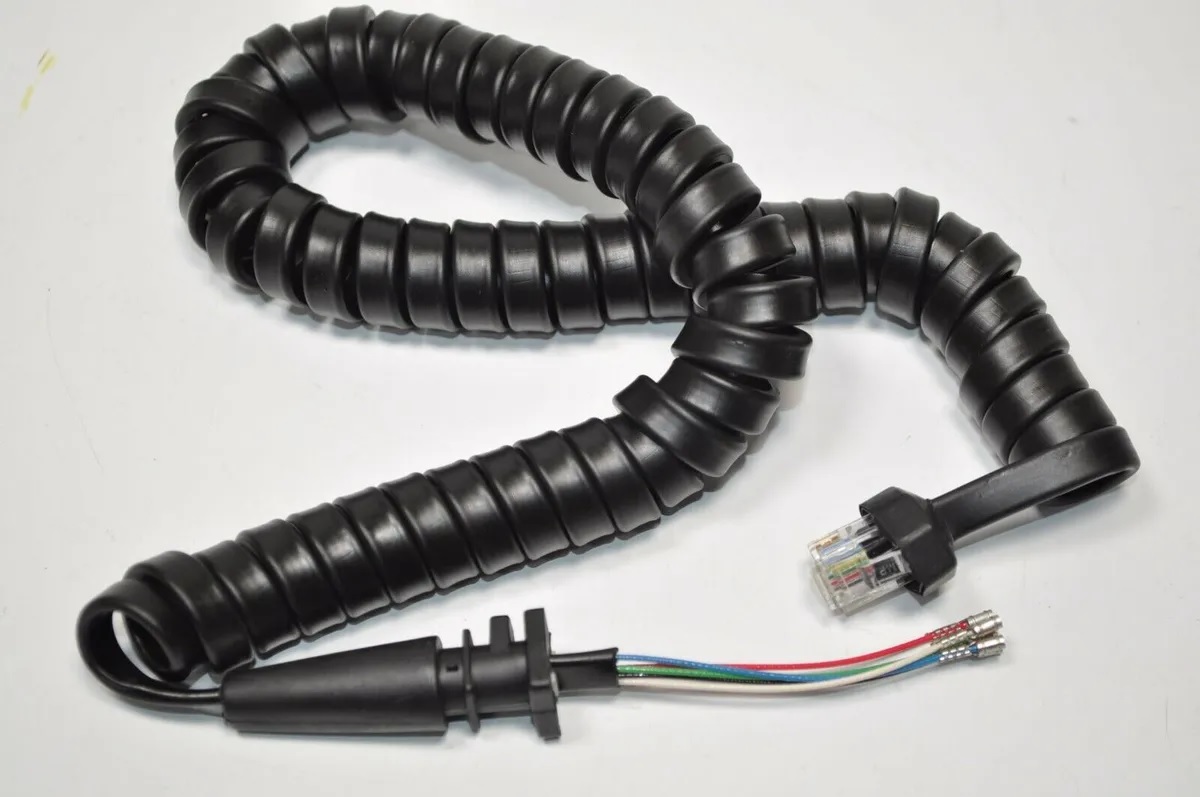
When the Quantar was being designed the HMN1001A microphone was the standard mobile microphone. It had the modular plug of that era (6-pins) on the radio end of the curly-cord and was used on the predecessor stations (the MSF5000 and MTR2000). As a result the Quantar documentation calls for an HMN1001A microphone or a TMN6164 handset. The schematic of the actual handset and therefore the pinout of the handset plug (and therefore the Quantar handset / microphone connector) can be found here. (opens in a new browser tab)
These days the a 6-pin handset or microphone is uncommon, however my opinion is that if you can find one it is worth acquiring one as a test unit for your Quantar field toolkit. If you can't find one then you can build an 8-pin jack to 6-pin plug cable adapter or you can modify almost any 8-pin RJ45-style Motorola microphone by replacing the cord with one that has a 6-pin plug. The part number for the HMN1001A (or B) 6-pin microphone cord is 30-80146D02 (thanks to Andy NC4AB for that number) and was about $55 in the 2005 price list. The 6-pin cords and microphones occasionally show up on ebay (that's where I found the photo).
If you need to buy one then look for a microphone that was used with the Maxtrac / Radius / GM300 series mobiles like the HMN3596A (schematic, detailed with part numbers, parts list, PCB layout) or the HMN1035 (schematic). (both open in a new browser tab). Note that both use the "Old Moto Pin numbers" in the table below. Try and find an original Moto microphone, those cases have screws in case you ever have to take it apart, most of the chinese clone cases are glued.
If you can't locate a 3080146D02 microphone cord there are 6-pin replacement microphone curly cords made for the older Kenwood mobiles (like the TK-705 / 760 / 780 / 805 / 880) that should be adaptable.
We would still like to find the HMN1001A (or B) info sheet that Motorola packed with the microphone and scan it to PDF so we can make the full info available here.
Note that the connector pins on the older 8-pin Motorola microphones were numbered backwards from Ethernet and modern microphones. The table below has both.
| Pinout of the Quantar SCM test handset (or microphone) connector (and an 8-pin microphone adapter) | |||||
|---|---|---|---|---|---|
| Actual SCM Handset Jack (6‑pin RJ‑11/12/14) | Quantar Notes | RJ-45 Microphone Jack | Microphone Notes | ||
| Jack Pin Number (Pin 1 is on top) | Quantar Signal Name | (Ethernet and new Moto pin numbers) | (Old Moto pin numbers) | ||
| 1 | Monitor / Hang-Up Box or Hookswitch (shorted to ground when mic is on-hook) |
The actual TMN6164 handset has no connection on this pin (the hangup switch is in the handset hang-up cup). |
6 | 3 | A test microphone for a Quantar can ignore this pin. |
| 2 | Handset Earpiece Audio | 1 | 8 | Ths signal is the same signal in the external speaker connector. | |
| 3 | PTT | 3 | 6 | ||
| 4 | Microphone Audio High | 4 | 5 | ||
| 5 and 6 | Ground | 5 | 4 | The 6-pin connector has 2 ground pins, the 8 pin has one. | |
| 2 | 7 | Not used in any microphone, is the radio's programming pin. | |||
| 7 | 2 | This pin is not used in the microphone on most radios. | |||
| 8 | 1 | This pin is not used in the microphone on most radios. | |||
The Quantar External Speaker Connector:
The front panel of the Quantar SCM control module has a tiny internal speaker, two modular connectors for an and that is fed by a low power audio amplifier. The Volume Up and Volume Down buttons on the front of the control module provide 16 levels of volume to the front panel speaker and to both the handset jack and to the external speaker jack.
The SCM also has At first glance you will think the speaker connector is the common RJ-11 / RJ-12 / RJ-14 style connector. That would make it easy.
Sorry, it is NOT. Instead the speaker connector is the
RJ-9 / RJ-10 / RJ-22 (they all share the
same 4-pin connector body) and they are the smaller modular
connector most commonly found (at least in the USA) on the wired
telephone handsets curly cords. The pins on the 4-pin modular test
jacks are aligned vertically. The top pin is pin 1 and the
bottom pin is pin 4.
Quantar SCM speaker connector pinout:
Pin 1: DC Ground
Pin 2: +14 VDC (Switched supply output intended to power an external amplified speaker)
Pin 3: Audio Ground
Pin 4: Speaker Line Audio Output (Line Level signal; maximum is 1.4V to 1.5V peak-to-peak)
Motorola took the easy way on the external speaker kit for the Quantar and just reissued a kit that was already in production and used for the exact same purpose on the MTR2000 / MTR3000 product line. That kit consisted of the 0185180U01 speaker cable and the HSN1000A amplified speaker (later replaced with the HSN1000B or BR, or the HSN1006A) that was originally designed for use with several mobile handheld chargers.
The 0185180U01 cable was simple: it had had the RJ-9 / RJ-10 / RJ-22 plug on one end and the other end had the 6-pin Molex connector that mated with the HSN1000A.
The HSN1000 amplified speaker (and the successors) had a 6-pin Molex
connector on it that was used for
audio in, audio ground, +12vDC
power in, power ground, and a pair of pins that were jumpered together... one
was the actual speaker, the other was the ouput of the audio amplifier inside
the speaker housing (there was a public address kit that replaced the jumper
with the contacts of a toggle switch that fed an underhood speaker).
Motorola also had a 6 foot extension cord for the 6-pin cable in the
NKN6455A cable, which was not included in the
MTR2000 / MTR3000 / Quantar kit.
The simplest way to find a speaker cable is to use the common cable that mates with the speaker jack on the Quantar: recycle a wired telephone handset cable (it has the correct connector on both ends), it is 4 conductors (the color code varied with the manufacturer). Find an amplified speaker that can be powered from +12 volts as that and ground can be found on the speaker connector. Salvage the handset connector from a regular desk telephone and mount it into the side of the speaker housing and then use the cord to connect the amplified speaker to the Quantar station.
Alternatively a common personal computer amplified speaker will work just fine, look for one that uses +12 to +14 volts (some are, some are powered by a 5 volt wall wart, some are powered from a USB jack - also 5 volts... You can find +5v on pin 8 of J17, ground is adjacent on pin 7).
Interfacing to External Controllers:
The Quantar / Quantro stations are capable of operating either as a full duplex repeater with in-cabinet repeat, or as a half or full duplex station.
The full duplex repeater with in-cabinet repeat uses the functionality of the Station Control module. They can be programmed with a Carrier Delay (also called a hang-in-timer), a Timeout Timer, and a CWID function with a programmable interval of 5 to 60 minutes. There is no internal DTMF decoder in the Quantar (unless you have a Station Access Mosule (SAM) installed). You can efectively turn the the repeater off and on by simply grounding or ungrounding pin 12 (the Transmit Inhibit pin) on the J17 connector on the rear of the Quantar chassis.
Interfacing to an external repeater controller requires placing the Quantar into full duplex mode with in-cabinet repeat disabled and connecting an external controller to connector J17.
The Quanter maintenance manual has a whole chapter on wiring to external controllers, including the wildcard tables you will need to create in order to handle audio routing.
The Quantar / Quantro "System Connector" at position J17 is the main point for connecting external hardware to the Quantar / Quantro station.
That 50-pin / 25 pair connector has been used heavily in the telephone industry since the late 1940s (yes, over 75 years) and is known by several names. Amphenol was the developer and first manufacturer and called it a "Blue Ribbon" or Series 57 connector. Standard sizes are 14, 24, 36, 50 and 64 pins. The telephone industry wanted multiple sources, so both Cinch-Jones and AMP added the Amphenol series 57 to their product lines under their own names. AMP called it the "Champ" (later renamed the "Champ .085") connector.
The telephone industry loved it because it was:The biggest user of the Amphenol "Blue Ribbon" or Amp "Champ" 50 pin / 25 pair connectors was the Bell Telephone / Western Electric company and GTE / Automatic Electric company, and every single supplier to that industry. They used a male connector every every multi-line office desk telephone from the 1950's onwards (over half a million!). The mating wall jack and every cable used another connector. The PBX or Key System used the same connector for the incoming and outgoing phone lines... the "RJ-21" demarcation point was yet another 50 pin connector and wired as the termination for from 1 to 25 analog voice lines or from 1 to 12 four-wire digital circuits (56K, T1 or ISDN).
- Self-Cleaning / Self-Wiping: The mating surfaces feature a flexing action from both contacts that wipes away dirt and oxidation during connection.
- Voltage Rating: 250 to 700 volts depending on configuration and wire insulation.
- Shell Construction: Features a zinc-plated outer shell with a chromate finish for corrosion protection; also available with all-plastic bodies or plastic bodies with metal shells for EMI/RFI shielding.
- Flexible equipment design: The connectors were offered in multiple assembly options: crimp tails for automated assembly (also called IDC for Insulation Displacement Connector), solder-cup tails for wire attachment or pin-style tails for printed circuit board mounting. Series 57 = solder, Series 157 = solderless, Series 57LE = right angle PCB terminal. They were also offered with multiple mating connector retainment methods including screws and clamps and later Velcro™.
- The contacts were gold over nickel for low-resistance and offering from 1 to 3 amps minimum of current carrying capability (depends on the manufacturer and if solder cup, IDC / crimp or PCB).
- And there was a field tool for crimping the connector. (off-site pointer, opens in a new browser tab)
The cable production line could use a power crimping tool (usually hydraulic or compressed air) to do the same job.Connector Confusion: There are web pages that call the the 50-pin male and female Amphenol connectors a "SCSI connector". Yes, it was used as the 1st of the half-dozen different SCSI generations to connect desktop computer systems to everything from tape drives to external hard drives to flatbed scanners to... this was the first exposure many people had to this type of connector, so unfortunately the name stuck.
There are web pages that call this 50-pin / 25 pair connector a Centronics connector. They are wrong, Centronics corporation used a 36 pin version as their printer connector, and it showed up on every Centronics, Okidata, HP, Epson (and IBM used Epson), Panasonic, and you name it computer during the PC revolution of the mid-1970s through the 1990s... Again, this was the first exposure many people had to this type of connector, so unfortunately the name stuck.
Other web pages the "HP-IB" or "IEEE 388" or "GPIB" (different names for the same technology) interface connector a Centronics connector, but those are also wrong as the GPIB connector used the 24 pin version.
Back to Quantars and connecting your equipment...
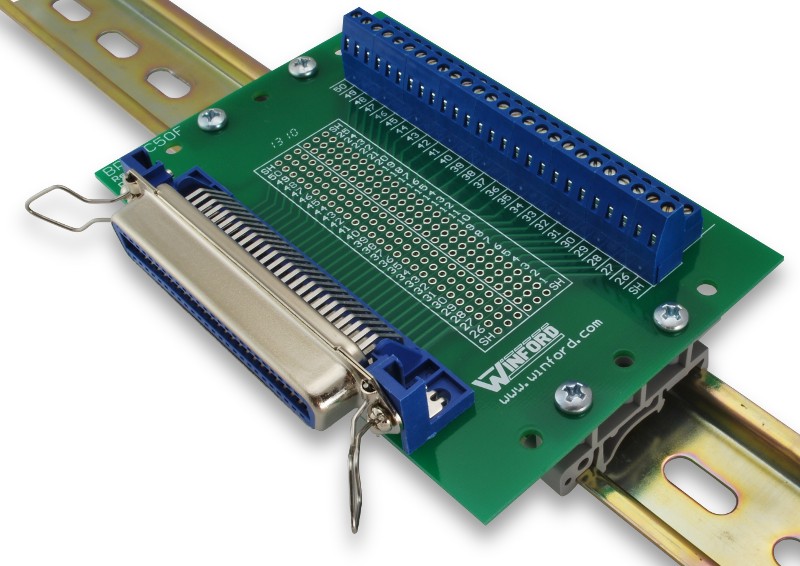
Winford Engineering (at https://www.winford.com)
makes a number of interfacing devices, one of which is
an RJ-21 termination / test
breakout module that I have used over the years when working on PBXs and key systems.
The Winford adapter
(larger photo of
the DIN rail version) has an Amphenol 50-pin female connector and two 25 screw
terminal strips that allow connecting to every pin. You can connect it to the Quantar
with a length of a male-to-male 25-pair telephone cable.
Winford Engineering does not make a male version of their 50 pin breakout board
however YOU CAN if you ask the folks at
(https://www.winford.com) they will be
happy to sell you a kit of all of the parts except the female 50-pin Amphenol right angle
connector. You then purchase a male right angle connector from Digikey (their part
number 1050RMA-ND)
Norcomp 112-050-113R001 and
assemble the kit... when you are done you will have a neat adapter that will plug
directly into the back of your Quantar and present all 50 pins on the connector
to 50 screw terminals.
NOTE: Due to the swap between the female to male connector the silk screening on
the Winford board will be totally WRONG!!! You can wash off the white ink with
a paint remover then add your own labeling.
Once you have your final pinout determined you can pull the Winford adapter from J17
and plug in a solder-vup male 50 pin connector and wire it with your custom cabling....
Mouser has "Obsoleted" the entire 50-pin Blue Ribbon and Champ 0.085 product
line and no longer stocks them, but Digikey has these: (20-26 ga wire)
A wireline card is required to use the station with external audio and PTT
to either J17 or the wireline connector at J61. The wireline card is not a module
but a daughter board that is located inside the Station Control Module.
These cards come in either a 4-wire or 8-wire type and either will suffice
for an external controller interface. You must enable wireline card in RSS
before you can use it.
Some advanced features are available only if you tell RSS your card is an
8-wire card even if it isn't (don't do a verify!)
Line1 is audio into the transmitter, Line2 is audio from the receiver.
Each is presented as a balanced pair, you can ground the – side
and use the + side as hot, or instead you can use J17 pin 30
as the receive audio, and J17 pin 5 as transmitter audio,
or J17 pin 9 as a flat audio input to the transmitter.

|
An Overview and Beginner's Guide
to Interfacing the Quantar station Reworked by Robert W. Meister WA1MIK Images show the major assemblies and all rear panel connectors. Describes the most common interfacing signals. |
|
|
Interfacing
The Motorola Quantar To The Arcom RC210 (off-site pointer to the Arcom web site) The Arcom RC-210 interfaces similarly to other external repeater controllers (i.e. the RLC and Scom). This article has a set of RSS screenshots on programming the Quantar. |
|
|
PDF of Quantar to CAT-1000
connections and 17 RSS screenshots of programming (author unknown) 750KB PDF file The CAT1000 is similar enough to the Scom and Arcom and Link / RLC connections. If anyone knows who created the PDF please let the page maintainer know so we can give credit. |
Articles and Brochures:
|
|
Ordering a Quantar Station Compiled
by Robert W. Meister WA1MIK A list of the major categories one would need to specify if ordering a new station. Now you can understand why model numbers are so hard to come by and could be nearly meaningless. |
|
|
General Quantar
Info from Motorolas Electronic Catalog 175 kB PDF file Equipment, options, descriptions, and prices. From September 2003. |
|
|
VHF Quantar Station Specifications brochure 266 kB PDF file dated 2004 |
|
|
UHF Quantar Station Specifications brochure 98 kB PDF file dated 2002 |
|
|
VHF-UHF-800 MHz Quantar Station Specifications brochure 2 MB PDF file dated 2004 |
|
|
800 / 900 MHz Quantar Data Base Station Specifications brochure 84 kB PDF file dated 2004 |
|
|
Quantar and Astro-TAC Receivers Specifications brochure 110 kB PDF file |
|
|
Identifying a Quantar Station
Submitted by Martin A Flynn W2RWJ Useful information and selection suggestions, plus lists of module numbers. |
|
|
Quantar Field Replaceable Units Compiled by
Robert W. Meister WA1MIK Lists of the various FRU part numbers with some context information which should tell you what your station is equipped with. |
|
|
Quantar OEM and FRU modules sorted by module number Compiled by Michael Morris WA6ILQ A table of the OEM and FRU module numbers sorted by module number. Modules with multiple numbers are listed by each number (multiple times). |
|
|
Quantar OEM and FRU modules sorted by module name Compiled by Michael Morris WA6ILQ A table of the OEM and FRU module numbers sorted by module name. |
|
|
Quantar Enhanced Wildcard Features Without Leaving In
The Enhanced Board Submitted by Josh Heide K6ZRX This programming feature was discovered purely by accident, but it opens up possibilities. |
|
|
Quantar
VHF Range 2 to Range 1 Amateur Band Modification Submitted by Rob
Lee K7TGU Rob refered to this as "One quick approach, a Rough Draft" but it's complete. |

|
One person reported "I was able to convert/tune a VHF R2 range receiver down to 144 MHz. It looks like the receiver has two VCOs, one for each of the ranges, high and low. When I tried to program it below 145.6 MHz the RX1 indicator flashed red. I figured the VCO was out of lock. There are two coils in one shielded section of the receiver PC Board which I found to be the VCO coils. I'm not sure yet which one is which, but I tuned each one turn clockwise then the RX1 indicator went green. I was able to tune the R2 preselector with no problem down to 144 MHz. There was no issue using the high range exciter and PA down to 144 MHz." |
|
|
The Transmitter audio input impedance is unusually low, about 500 ohms. Some external audio sources (like some amateur radio repeater controllers) do not have sufficient audio level. This can be cured with an external amplifier, or modifying the external device for a higher level. |
|
|
The Motorola 9175300H02 (opens in a new browser tab) VHF 144-160 MHz 100 watt Duplexer option for the Quantar or GTR Repeater WILL NOT work in a 600 KHz receiver‑to‑transmitter situation. This is a $1400‑$1500 dollar option that is effectively a chinese knockoff (made by Fingu) of a Celwave / RFS PD5042 family duplexer and has a minimum channel spacing of 1.5 MHz. Go read this page for the full story on Fingu. (off-site pointer, opens in a new browser tab) |
|
|
Likewise the Motorola 0185417U02 (opens in a new browser tab) VHF 144-160 MHz 100 watt VHF band-pass duplexer option X182AB for the Quantar, MTR2000 and MTR3000 repeaters also WILL NOT work in a 600 KHz receiver‑to‑transmitter situation. That unit is a relabeled chinese clone ("FINGU 29650003" (opens in a new browser tab) of a 6-cavity RFS/Celwave PD5042-1-50 unit that has a 1.5 MHz minimum transmitter to receiver separation. Any Telewave, Phelps Dodge, RFS or Cellwave duplexer is preferred over any Fingu. |
|
|
If you have a high power Quantar there is a fan in the power supply and two fans in your high power PA.
Don't let the fans die. It gets expensive if you do. The PA fans are NOT the same as the power supply fan. The fan in one of the power supplies was a 92mm square fan that is 20mm thick, 12VDC, 0.18A, 2900RPM, ball bearings, 3-wire fan (with a tachometer lead). A good replacement is the Mouser 664-D0912HBA73GLLF, and is less than US$15. When the PA fans die use two of the Qualtek FAD106025CBHW12A as replacements (60x60x25mm, 12 volt, ball bearing, 70,000 hours), available from Mouser as 562-FAD106025CBHW12A and under US$15 each. |
|
|
Repeater-builder received an email...
To: (repeater-builder staff) Subject: Quantar P.A. reflectometer issue... (something for the Quantar page) I've been a Land Mobile electronic technician for over 40 years, and have used your site for info many times. I'm presently employed as a county radio tech, and we are waiting on Motorola to switch us to a new system. So in the meantime they hired me to help maintain their present 800 MHz SmartZone trunking system that is still using 800 MHz Quantars. They have had a huge issue with the Quantar power amps going bad. What I've discovered is the reflectometer circuit on the low pass filter/coupler hybrid board in the 800 MHz P.A has printed resistors on the ceramic substrate that start changing value with increasing resistance, that causes the station to compensate until it burns up the P.A. or pops a transistor. The printed resistors dont look burnt, they just change value by aging I guess. My solution is to cut the circuit trace behind the RF choke on both forward and reflected sides, and solder in a 300 ohm chip resistor to fix the reflectometer. I could not find schematics on that board, so I assume Motorola kept them as proprietary..... I've seen this and fixed it in three different 800 MHz PA modules: CTF1091B, CLF1849A and TLF1930C. The Quantars that a ham will see are almost always VHF or UHF. I don't know if the design of the VHF and UHF P.A. modules has the same problem. Thanks for the website my friend!... |
|
|
W9CR's Quantar Wiki page contains even more Quantar tidbits and helpful parts information. |
Manuals:
PDF versions of any manual that is currently available from Moto won't be posted
here at Repeater-Builder. The older manuals that are Cancelled or No Longer Available
(NLA) are a different story.
If anyone discovers a manual has been Cancelled / switched to NLA status
please let us know. If you have that PDF please forward it to us for posting.
Any prices listed below should be taken only as a rough guideline. Motorola adjusts prices quarterly, and offers one set of prices to their dealers / service shops, another on their order desk, and a third to self-maintaining fleet customers (i.e. police departments, fire departments, etc).
As of the time of this writing (April 2011) most of the Quantar and Quantro product line is current Motorola products and manuals are still available for purchase.
The Quantar manuals we know of are: (if others
appear please send the page maintainer a PDF, he will post the information here)
|
|
6881088E90-G Quantar / Quantro Service Manual - This is the service manual for the Quantar station, the Quantro station, the DSS-III, the ASTRO-TAC Comparator and the ASTRO-TAC receiver. It includes schematics, part location details, and parts lists, for every module EXCEPT the power supplies. The -G version of this paper manual (current as of this writing) is over five inches (12.7 cm) thick, came in two 3-ring binders, and weighed 15 pounds (5.6 kilos). | ||||||||||||||||||||||||||||||||||||||||||||
|
|
6881095E10 Quantar User Guide | ||||||||||||||||||||||||||||||||||||||||||||
|
|
6871012P36 Quantar Instruction Manual on CD-ROM Anyone have a Table of Contents? The contents of this CD-ROM may already be on the web. |
||||||||||||||||||||||||||||||||||||||||||||
|
|
6881127E40 Quantar Repeater / Station Access Module (SAM) Manual This module adds DTMF control functionality to the the Quantar (which has no DTMF decoder chipset). |
||||||||||||||||||||||||||||||||||||||||||||
|
|
Quantar Satellite Receiver Instruction Manual 68P81087E25-O | ||||||||||||||||||||||||||||||||||||||||||||
|
|
Quantar RSS Instruction Manual 6881085E35-AG (for unknown version of RVN5002 Programming Software) 20.0 MB PDF file. Dated 12-30-2006. |
||||||||||||||||||||||||||||||||||||||||||||
|
|
Quantar RSS Instruction Manual 6881085E35-AN Rev 14.10.00 of RVN5002 Programming Software 18.87 MB PDF file. Dated 06-30-2011. |
||||||||||||||||||||||||||||||||||||||||||||
|
|
Quantar RSS Instruction Manual 6881085E35-AR Rev 14.12.00 of RVN5002 Programming Software 19.96 MB PDF file. This manual is dated 08-30-2014 and is the for the last version that supports both wide and narrow. |
||||||||||||||||||||||||||||||||||||||||||||
|
|
Quantar RSS Instruction Manual
6881085E35-AT Rev 14.13.00 of RVN5002 Programming Software 18.9 MB PDF file. This is the manual for the last RSS version, is dated 03-31-2015 and is narrowband only. |
||||||||||||||||||||||||||||||||||||||||||||
|
|
Quantar Digital-Capable Station Instruction manual, p/n 68P81095E05-B, scan courtesy
of Eric Lemmon WB6FLY (SK). This is the complete comprehensive Motorola QUANTAR Instruction Manual (VHF, UHF, 800 MHz, 900 MHz) 68P81095E05 that has the operational and servicing data and includes station installation, module configuration and removal, and all interfacing information for the Conventional, SECURENET, ASTRO, 6809 Trunking, and IntelliRepeater systems on VHF (25 and 125 watt), UHF (25, 100, and 110 watt), 800 MHz (20 and 100 watt) and 900 MHz (100 watt). When it was available in paper form it was over two inches (5 cm) thick. The last entry is the complete manual.
|
||||||||||||||||||||||||||||||||||||||||||||
|
|
Quantar PDR 3500 Portable Repeater Basic Service Manual 6881093C75-O 780 kB PDF file. |
Back to the top of the page
Up one level (Moto index)
Back to Home
Contact Information:
The author and page maintainer, Mike Morris WA6ILQ, can be contacted here.
He'd like to thank Ken Arck AH6LE of Arcom for some of the information above. He's known Ken since the late 1970s and Ken is good people.
Hand-coded HTML © Copyright 2009 and date of last update by the Repeater-Builder staff.
Motorola, Quantar, Quantro, and a whole bunch of other terms are trademarks or registered
trademarks of Motorola, Inc.
This page created 02-Sep-2009.
This web page, this web site, the information presented in and on its pages and in these modifications and conversions is © Copyrighted 1995 and (date of last update) by Kevin Custer W3KKC and multiple originating authors. All Rights Reserved, including that of paper and web publication elsewhere.